Posting Isn't Communicating: How I Fixed Our Release Notes Problem.
Release notes were getting buried in Slack. So I built one place where every update is translated, approved and tracked.
For a while, my team had a communication problem that looked small and wasn't. Every time we shipped a feature, shipped an internal tool, or updated and enhanced our product, someone posted a note about it in Slack and moved on. Most people never saw it. The ones who did often couldn't make sense of it.
Here's the problem I saw, and how I solved it.
The problem I saw
I run a concierge operations team. Our people spend their day serving clients, and they do it using a set of internal tools our engineering team built in-house. Those tools change all the time: new features, bug fixes, tweaks to how a workflow runs. Every one of those changes affects how my team does their job.
The way we shared those changes was simple. Someone posted a release note in Slack. It landed between a client escalation and a few emoji reactions, and by the end of the day it was hundreds of messages up the channel.
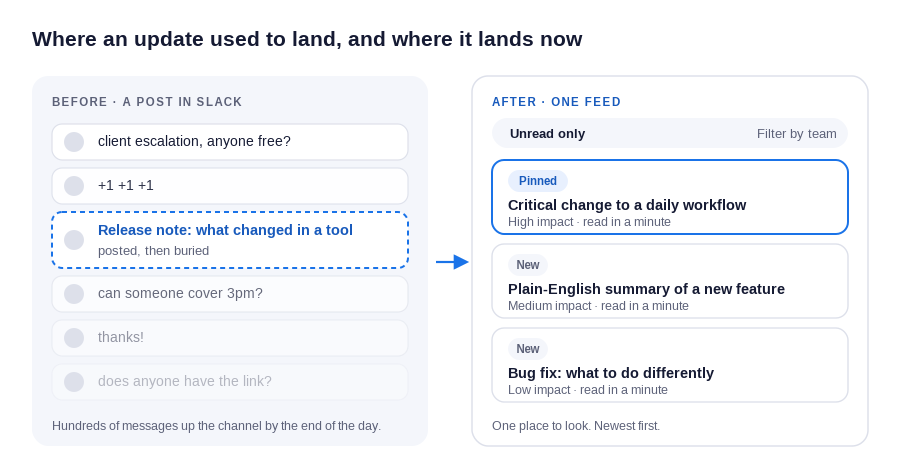
When I looked closely, it wasn't one problem. It was three.
Too much noise. Release notes lived in the same place as everything else, so the important ones got buried.
No proof anyone read them. I had no way of knowing who had seen an update and who hadn't. We were hoping, not tracking.
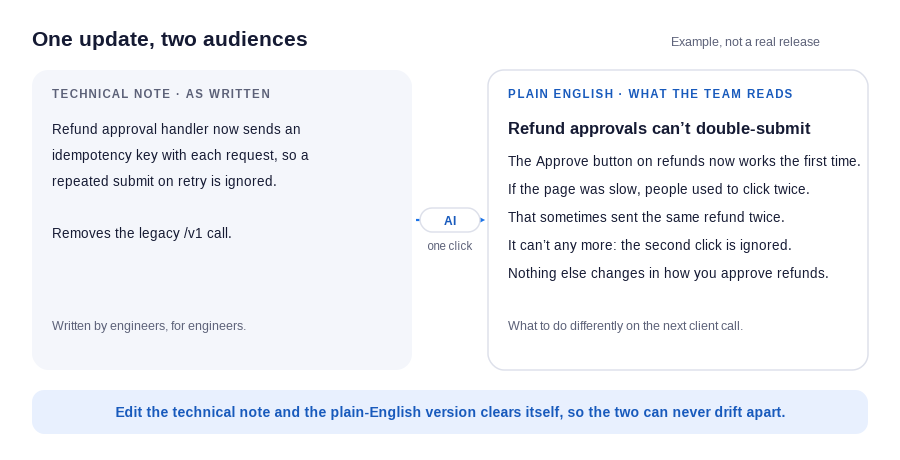
A translation gap. Engineering notes are written by engineers, for engineers. My team is customer-facing. A line full of technical jargon doesn't tell them what to do differently on their next client call. Someone had to translate it by hand, and that someone was usually a busy team lead.
The result was predictable. People found out about changes the hard way, in the middle of serving a client. Not because they were careless, but because we never really gave them the information.
How I solved it
I didn't want a better Slack post. I wanted a proper home for this one job. So I built Release Desk, a small internal web app where every update travels the same path, and every step has an owner.
- Someone writes it. A team lead or product person fills in a short form: what changed, what kind of change it is, how big the impact is, and when it goes live. Then they paste in the technical note exactly as engineering wrote it.
- AI translates it. One click turns the technical note into five to seven sentences of plain English, plus a clear title. If anyone edits the technical note afterwards, the translation clears itself, so the plain-English version can never drift away from what actually shipped.
- A manager approves it. Nothing reaches the team without a second set of eyes. An approver can publish it now, schedule it for later, or send it back with a note on what to fix.
- The team reads it. Approved updates land in one clean feed, newest first, showing only what you haven't read yet. People can filter to their own team, and anything critical can be pinned to the top.
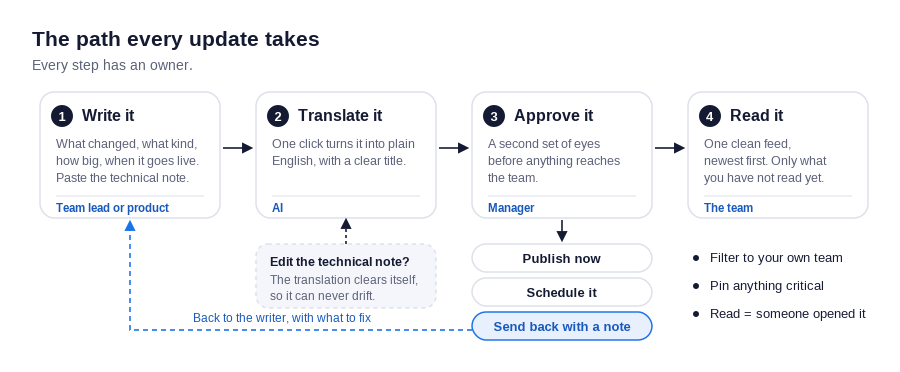
The person writing the update no longer has to be a translator. The approver no longer has to clean up after the fact. And my team finally has one place to look.
| The problem | What fixed it |
|---|---|
| Too much noise | One feed for updates only, unread first, filtered to your team, with critical ones pinned |
| No proof anyone read them | An update counts as read when it's opened, or when the quiz is passed, with a report for managers |
| A translation gap | Plain English written for the team, regenerated whenever the technical note changes |
Handling the wall of notes
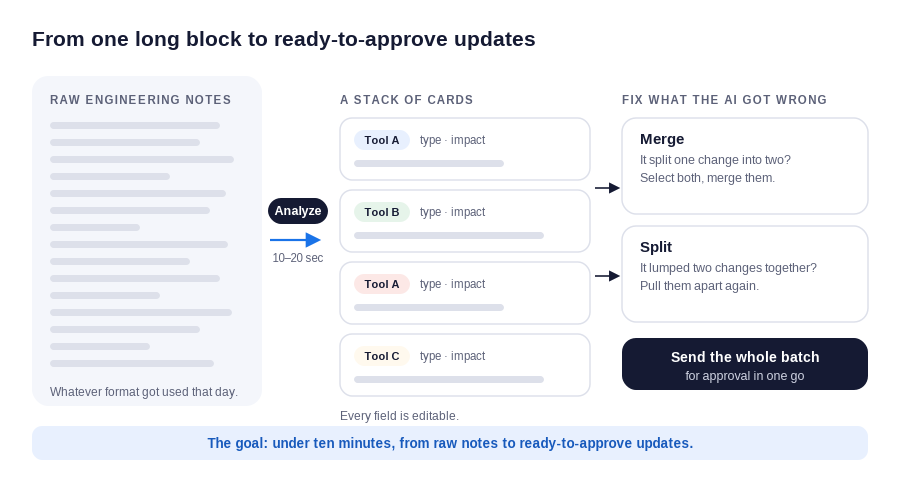
Single updates were the easy part. The real test was the big release: one long block of raw engineering notes covering a dozen changes across different tools, in whatever format happened to get used that day.
So I added a batch import. You paste the whole thing in and click one button. AI pulls out each separate change, works out which tool it belongs to, labels its type and impact, and writes a plain-English title and summary for each one.
What comes back is a stack of cards, colour-coded by tool, and every field is editable. If the AI split one change into two, you select both and merge them. If it lumped two changes together, you split them apart. When it looks right, the whole batch goes for approval in one go. The goal is under ten minutes from raw notes to ready-to-approve updates.
Knowing it actually landed
This was the part I cared about most. Posting an update isn't the same as someone understanding it.
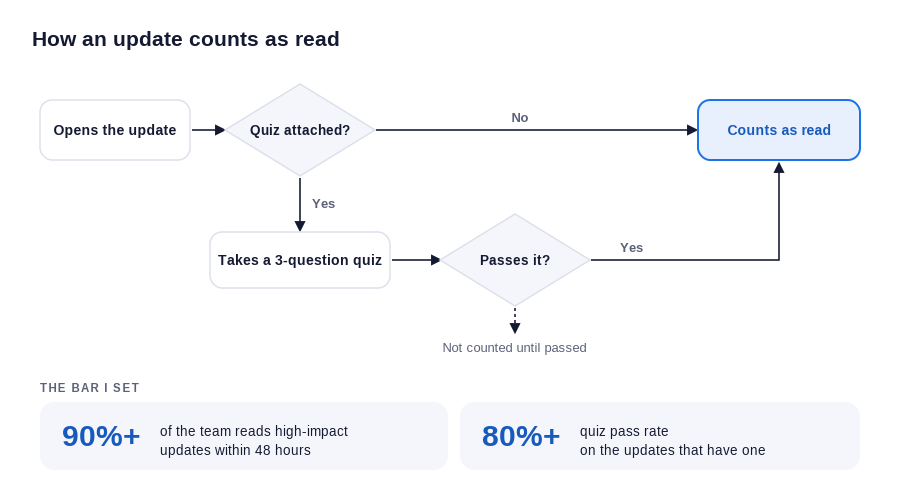
In Release Desk, an update counts as read when someone opens it. For changes that really matter, the writer can add a short quiz. AI generates three multiple-choice questions from the update, and it only counts as read once the person passes. You can also attach a short video walkthrough or a link for anyone who wants to go deeper.
Managers get a report for every update: how many people have read it, what share of the team that is, and how many passed the quiz. They can click in and see exactly who has and hasn't.
That changed the conversation. Instead of asking "did everyone see the update?" a team lead can say "three people haven't opened it yet, let's give them a nudge."
The bar I set: more than 90% of the team reading high-impact updates within 48 hours, and quiz pass rates above 80%.
What I learned
The first version is live, and I kept it small on purpose. No email alerts, no integrations with other tools. People check the feed themselves while we learn how they actually use it.
The bigger lesson has nothing to do with release notes. A lot of operations work runs on "I posted it, so it's done." But posting isn't communicating. The fix usually isn't trying harder in Slack. It's giving the work a proper home, with a clear owner, a quality check and a way to know it landed.
Release Desk does that for one small, important job. It's the same pattern I keep coming back to everywhere else.